






















Key takeaways
- Location-based personalization adapts website and app content to a visitor's country, region, city or distance to a store. It uses IP address, device location, in-venue signals or a location the visitor declares.
- Location-based marketing uses location to serve ads and push notifications. Location-based personalization changes the content of the experience you own.
- In Deloitte Digital’s 2026 survey of 1,000 US consumers, 52% said they’re more likely to buy from brands that personalize their experiences, and they report spending 30% more with those brands on average.
- Showing content by country, based on the visitor’s IP address, usually works without a permission prompt, although GDPR still requires a legal basis. Using a visitor’s exact position from GPS or in-store beacons requires their explicit consent first.
- In the CoreMedia DXP, editors tag content with a location in CoreMedia Studio. Spatial search and location-based visitor segments then show each visitor the stores, events and offers that apply to them.
What is location-based personalization?
Location-based personalization adapts digital content, offers and experiences to a visitor’s geographic location, whether that is a country, region, city or distance to a store or venue. The location comes from IP addresses, GPS, Wi-Fi or beacons, or from something the user declares, such as a store selection or a delivery address.
The term often gets confused with three related practices because all four use location data. Only location-based personalization changes the content of your own website or app for each visitor.
| Practice | What it changes | Typical location tracking | Where it runs |
|---|---|---|---|
| Location-based personalization | Content, offers and modules for each visitor | IP address, device location, declared location | Owned website, app, in-store screens |
| Localization | Language, currency, product availability, delivery options and legal text for each market | Market or language selection | Country and language versions of a site |
| Location-based marketing (geolocation marketing) | Which ads, personalized messages or push notifications a person receives | Device GPS, geofence, beacon | Ad networks, apps, SMS |
| Geotargeting | Where digital advertising is shown | IP address, postal code, ad platform settings | Search and display ad platforms |
Location-based marketing often relies on a geofence. A geofence is a virtual perimeter around a specific location that triggers targeted ads or a push notification when a user enters the area. It is a campaign tool aimed at potential customers outside your site. Location-based personalization works inside the customer experience, so a visitor who never installs your app still sees content that fits where they are.
How location-based personalization works
Location-based personalization turns a location signal into content in five steps. The process starts with finding out where the visitor is and ends with measuring what the location-specific content achieved.
- Resolve the location signal.
- An IP address lookup estimates the customer's location at country and region level in real time, without asking the visitor.
- GPS or browser geolocation is precise but needs the visitor’s permission.
- Wi-Fi and beacons work inside a venue, usually through mobile apps.
- A declared location, such as a chosen store, postal code or account address, is the most reliable because the customer provided it.
- Add it to the visitor profile. Location becomes one more data point in the customer profile, next to behavioral signals such as pages viewed, cart contents or buyer intent from search terms. Location tells you which branch, campaign or product range is relevant, and behavior tells you whether the visitor wants it now. Two visitors in Munich see the same regional content by default. If one of them has just compared mortgage rates, the page can add the nearest branch with a mortgage advisor. A customer data platform keeps that profile current across visits.
- Choose the content. Rules handle most cases, for example “if region = DACH, show the DACH spring offer.” Rules are easy to set up and test, but someone has to write and maintain each one. Once there’s enough data to learn from, AI-driven selection can take over: instead of one rule per location, it picks content for each visitor by combining location with behavior and learns from what converts.
- Deliver it. Location-tagged content and market variants of a page are assembled for each visitor. Spatial search, which finds the nearest relevant items, fills in local content such as stores and events.
- Measure and adjust. Track conversion and customer engagement for each location segment, then feed the results back into the rules.
IP-based location is an estimate, so plan a fallback. VPNs, corporate networks and mobile carriers can place a visitor in the wrong city or even the wrong country. A good setup handles this in three ways:
- It shows a sensible default page.
- It treats IP location as a suggestion rather than a fact.
- It keeps a visible “set your location” option or store selector, so the user can correct it in one click.
Which location signals are accurate and which need consent
The table below compares the four main location signals by accuracy and consent requirements.
| Signal | Accuracy | Consent requirement | Typical use |
|---|---|---|---|
| IP address | Reliable at country level, rougher at city level | No browser prompt, but still personal data under GDPR, so it needs a legal basis | Country site suggestion, regional offers |
| GPS or browser geolocation | Precise, especially on mobile devices | Browser or operating system permission, usually consent under GDPR and ePrivacy rules | Nearby store, local inventory |
| Wi-Fi and beacons | Precise inside a venue | App permissions for location and Bluetooth, plus consent | In-store content, proximity alerts in apps |
| Declared location (store selector, postal code, account address) | As accurate as what the customer enters | Provided by the customer for a stated purpose and covered by your privacy notice | Store pages, delivery availability, regional pricing |
8 location-based personalization examples
Location-based personalization pays off in any industry where offers, stock, regulation or physical locations differ by place.
- Financial services: products only where they are licensed. A bank or insurer shows the products, rates and disclosures that apply in the visitor’s jurisdiction, plus content for the nearest branch.
- Signal: IP country or region, confirmed by the customer’s address after login.
- Goal: lower compliance risk and no wasted traffic on products the visitor can’t buy.
- Retail: nearby store and local inventory. A product page shows the nearest store, whether the item is in stock there, and a promotion that only runs at that store.
- Signal: IP or GPS, refined by the store the shopper selects.
- Goal: turn e-commerce visits into retail store purchases and give shoppers a reason to visit.
- Travel and hospitality: market-specific routes and offers. Airlines and travel companies show each home market its own routes, prices and offers, and use customer data to alert the right travelers about new routes. Finnair runs its digital experience across 34 markets in 14 languages and feeds CRM data into the CMS to target offers. The airline reports improved conversion rates and more repeat purchases.
- Signal: market and customer data.
- Goal: offers that fit the traveler’s home market.
- B2B manufacturing: dealers, units and certifications per market. A buyer in Texas sees imperial units, US certifications and the closest authorized dealer. A buyer in Lyon sees metric units, CE marking and a French sales contact.
- Signal: IP country plus the company location the buyer declares.
- Goal: send qualified leads to the right partner from the first visit.
- Fashion and luxury: regional collections and season-aware content. In December, Porto sees light jackets and layering pieces for a mild winter, while a visitor in Hamburg sees coats. Hero images can also follow local weather.
- Signal: IP-based country or region.
- Goal: product pages that match what the customer can wear now, which supports conversion rates in e-commerce.
- Telco: regional tariffs and coverage by postal code. A visitor enters a postal code and sees the fiber speeds, network coverage and regional bundles available at that address.
- Signal: declared postal code.
- Goal: fewer abandoned orders caused by tariffs that turn out to be unavailable.
- Events and in-store: content that follows the visitor into the venue. When a visitor walks into a store or trade show, the app switches to the floor plan, today’s sessions or in-store offers. Visitors who opted in can get a push notification as a proximity alert. The same content can also run on in-store screens connected to an omnichannel CMS.
- Signal: beacon or Wi-Fi, with app permission.
- Goal: increase foot traffic to specific areas and connect online content with physical locations.
- Multi-country websites: suggest the market. Instead of a hard redirect, the site asks: “It looks like you’re in Austria. Switch to the Austrian site?” The market switch stays visible on every page.
- Signal: IP country.
- Goal: visitors land in the right market and language.
Language is the boundary with translation and localization. The market suggestion decides which country version a visitor sees, and localization makes that version usable. Suggesting a market rather than redirecting keeps you compliant in the EU. The Geo-blocking Regulation (EU) 2018/302 bars traders from redirecting customers to another country version of a site based on their nationality or place of residence without their explicit consent. Even with consent, the version the customer first tried to reach must stay easily accessible.
Example: location-tagged content and spatial search in a DXP (CoreMedia)
In the CoreMedia Digital Experience Platform, editors tag content with a location, and spatial search returns the items nearest to the visitor’s position or chosen location. Query lists place those results on a page, so one landing page shows each visitor the stores, events and offers closest to them.
The setup takes four steps:
- Tag content. In CoreMedia Studio, any content item can carry a location tag. An article such as “Paris fashion, where dreams come true” gets the tag “Paris.” Store pages, events and offers get their own locations.
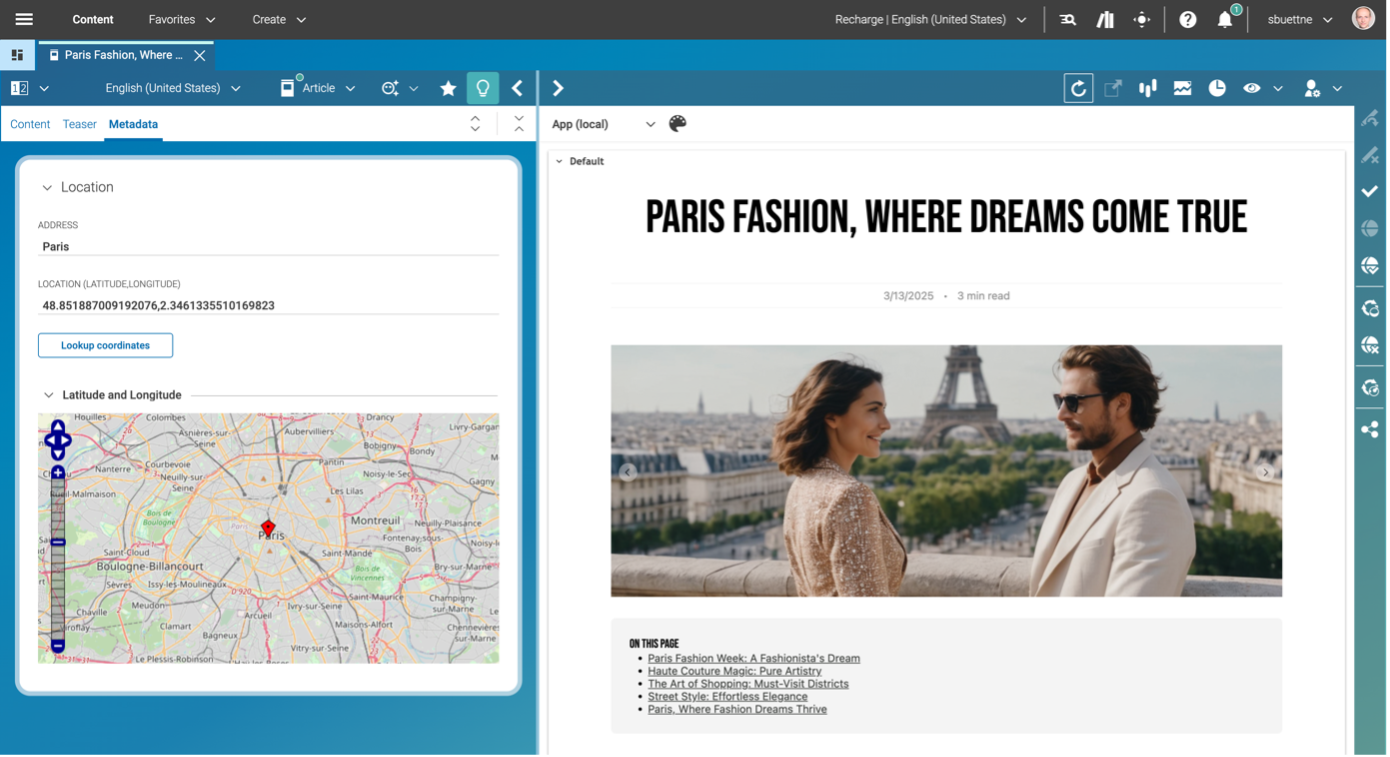
- Index the location. Spatial search stores latitude and longitude in the search index, so a query can find every tagged item within a given distance of a point.
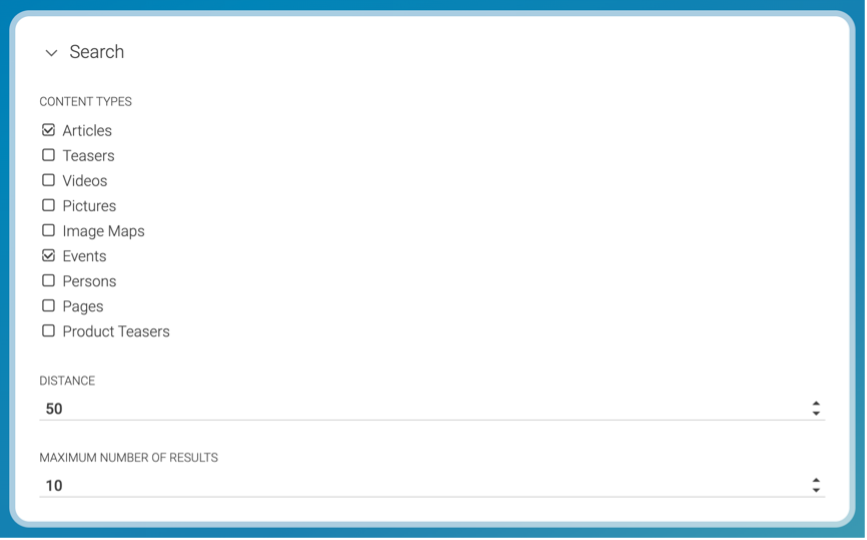
Build a query list. Editors set up a query list in CoreMedia Studio, filter it by content type (stores, events, articles, products) and set a maximum distance. A query list is a dynamic collection: it selects content items, such as articles, videos, products or pictures, that meet set conditions, and it can be used anywhere a regular article can.
- Render for each visitor. When the page loads, the query list runs the spatial search for that visitor and fills the module in real time.
Here is how one landing page plays out for three visitors:
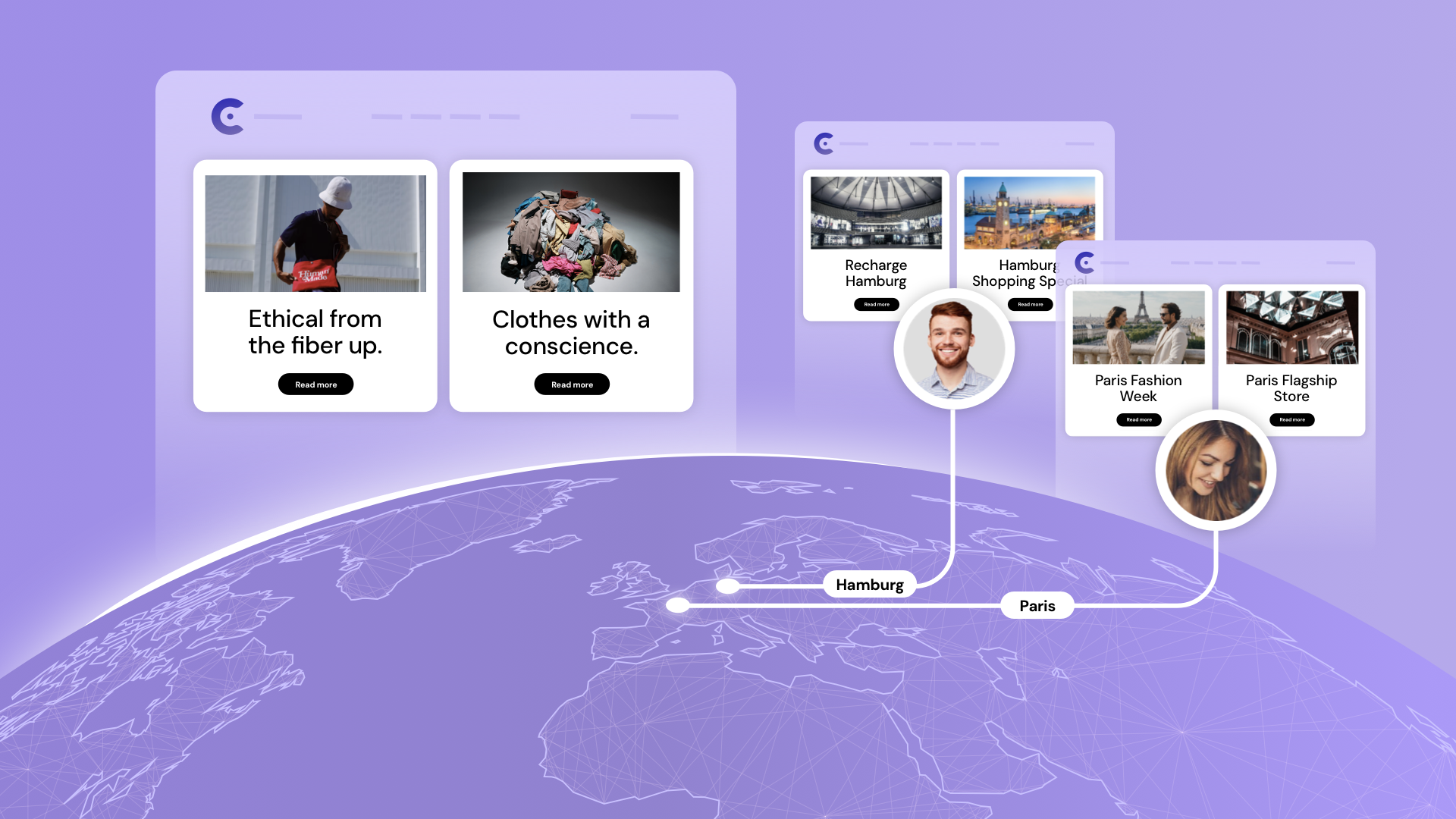
- A visitor in Hamburg who shares their location sees the nearest store, a local event this weekend and a regional offer.
- A visitor in Paris sees the Paris flagship store and Paris fashion stories.
- A visitor who declines to share a location sees a default page with general content, so no module is ever empty.
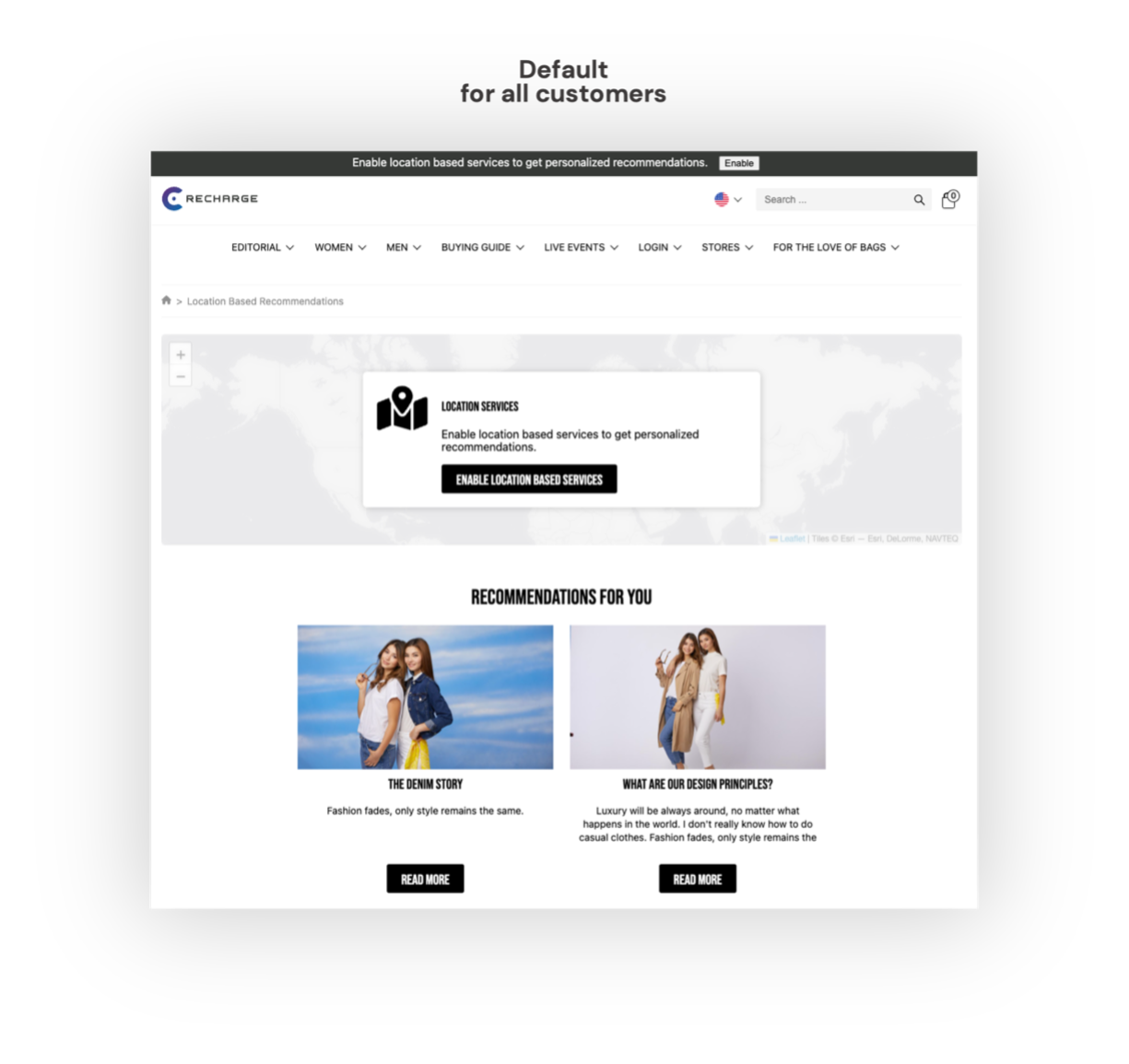
In our example, visitors have the choice to share their location to get more personalized recommendations.
When the customer has chosen to share the current location, relevant content can be delivered by CoreMedia CMS.
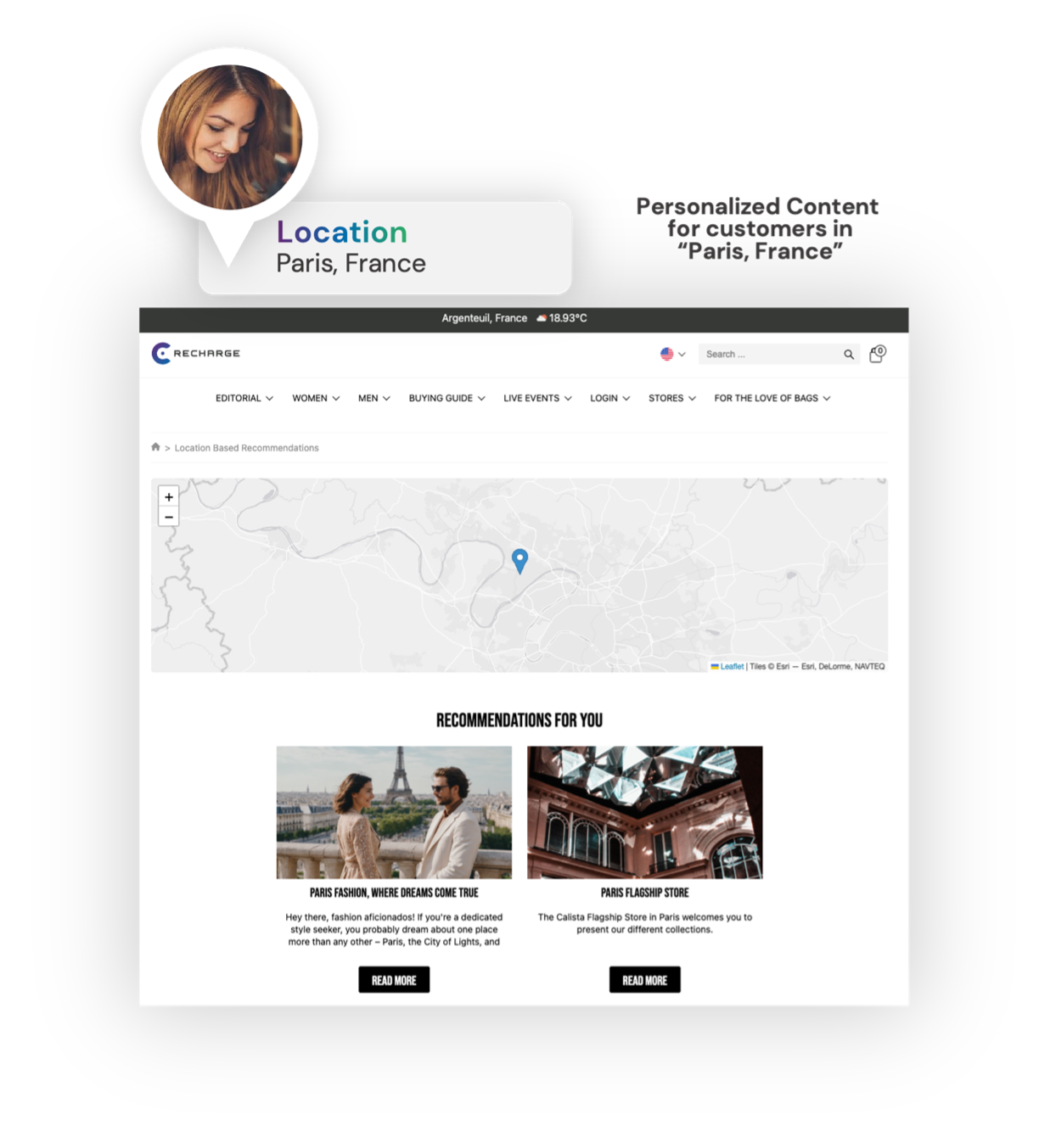
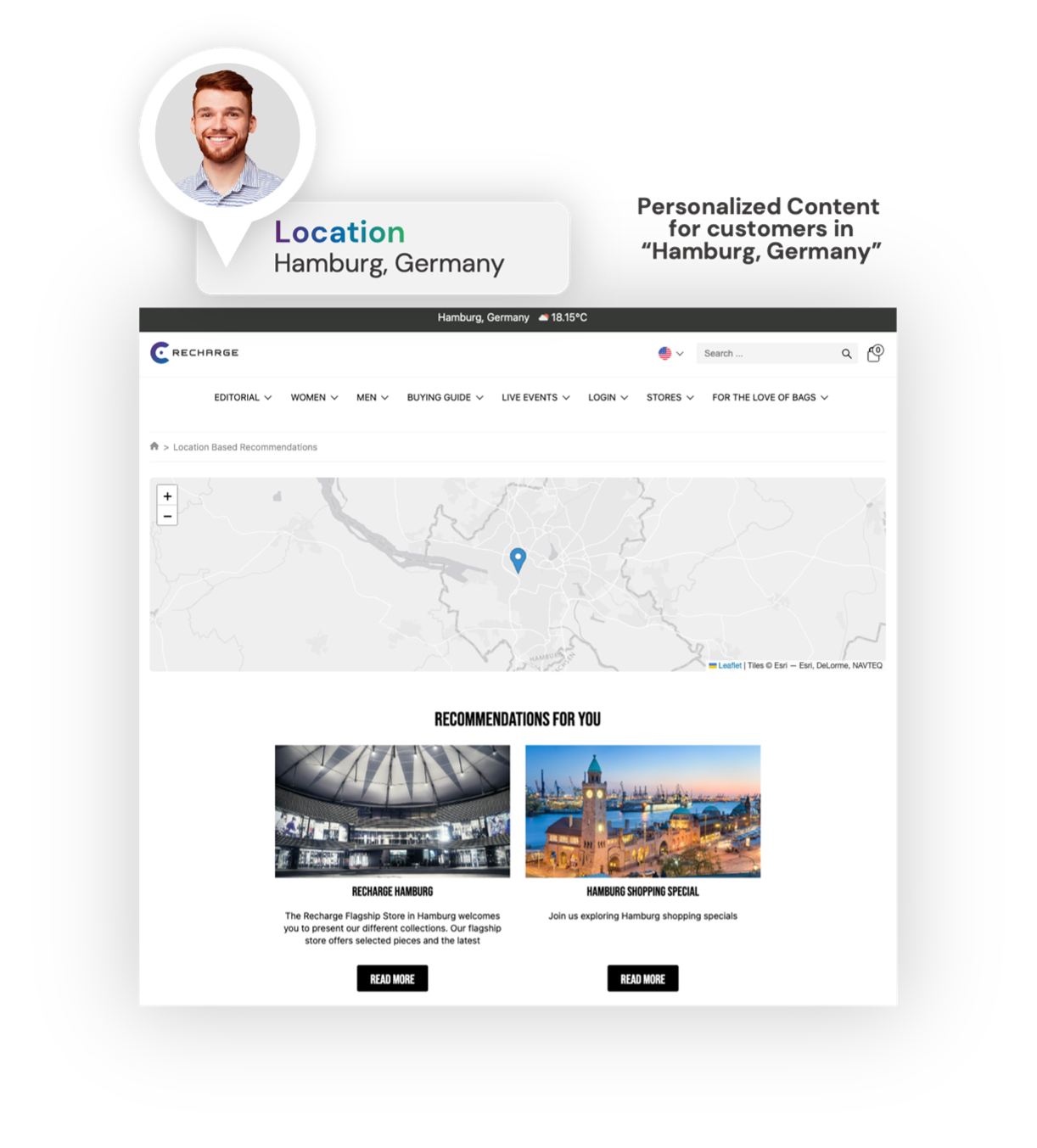
The screenshots above show a default landing page and two personalized variants for a customer located in Paris and another one located in Hamburg. As you can see, depending on the location, different recommendations are shown such as events or nearest stores.
The same tagged content and query lists can feed the website, the app and in-store screens. That works because the content management in the CoreMedia DXP is a hybrid headless CMS that serves every channel from one authoring environment. Editors manage location-based content in the same content management interface they already use. Developers get the content through APIs as part of the wider digital experience platform.
Customer segmentation by country, region and proximity
Customer segmentation by location groups visitors at different segment levels: country, region or state, city, a radius around a store, and the market the visitor chose. Rules then map content to each segment, and the visitor sees the matching banner or teaser in real time.
In the CoreMedia DXP, marketers define visitor profiles with rules on the visitor’s location. They can combine those rules with other data points, such as new or returning visitor, lead score or traffic source. Because visitor profiles and content run on the same platform, editors use those segments directly in CoreMedia Studio and map content to each one. For example:
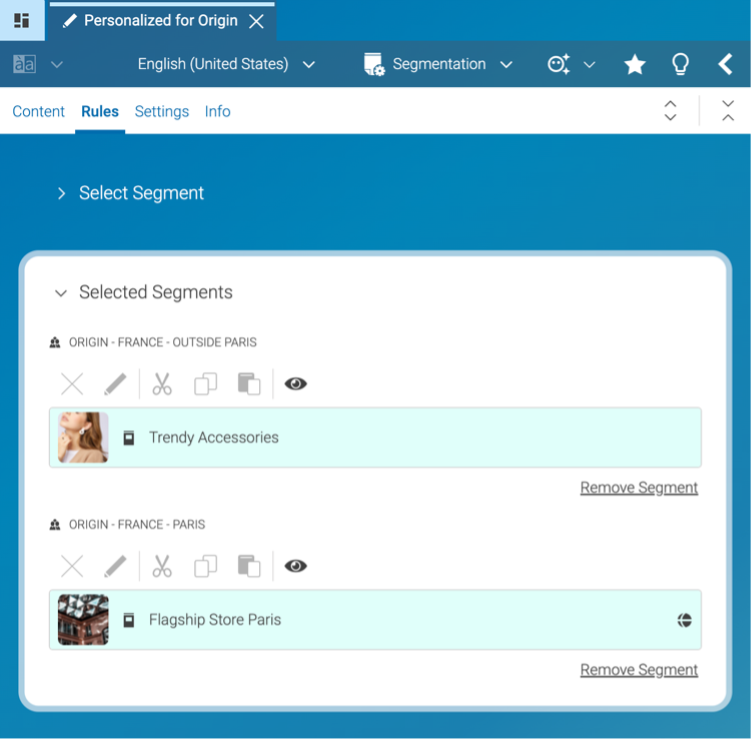
- Visitors in the Paris region see a teaser for the “Flagship store in Paris.”
- Everyone else sees a general story on trendy accessories.
Location rarely works alone. The strongest segments combine it with behavior, lifecycle stage and consent status: a first-time visitor in Vienna gets a store introduction, and a loyal customer in Vienna gets the local event invitation. CoreMedia's personalization & experimentation capabilities, including audience segmentation, cover these combinations.
Segments only stay accurate if every market uses them the same way, so multi-market brands also need clear governance:
- A central team owns templates and global segments.
- Local teams own their regional variants.
- Written rules state what a market may override, and what it may not, such as legal text and brand campaigns.
Most failures come from three habits:
- Forcing redirects instead of suggesting a market.
- Hiding the market switch.
- Treating language as location. A French speaker in Montreal and a German speaker in Zurich need different offers from visitors in Paris or Berlin.
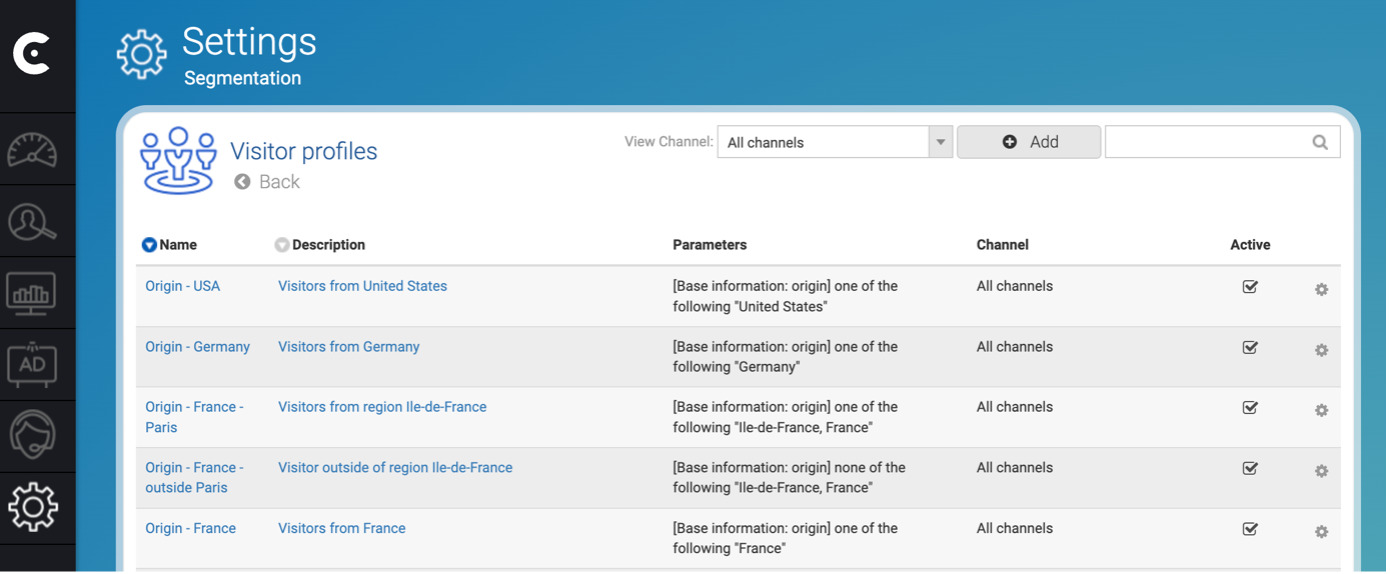
These segmenting rules are dynamically applied to visitors in real-time to personalize their experience throughout the customer journey.
The tight integration of the Content Management System and Customer Engagement Platform enables marketeers to use the defined segments when creating personalized content experiences. So, if users want to render specific banners depending on the visitors’ location instead of just showing a list of nearby matching results as described above, they can set up segmentation content in CoreMedia Studio, mapping specific content to a defined visitor segment.
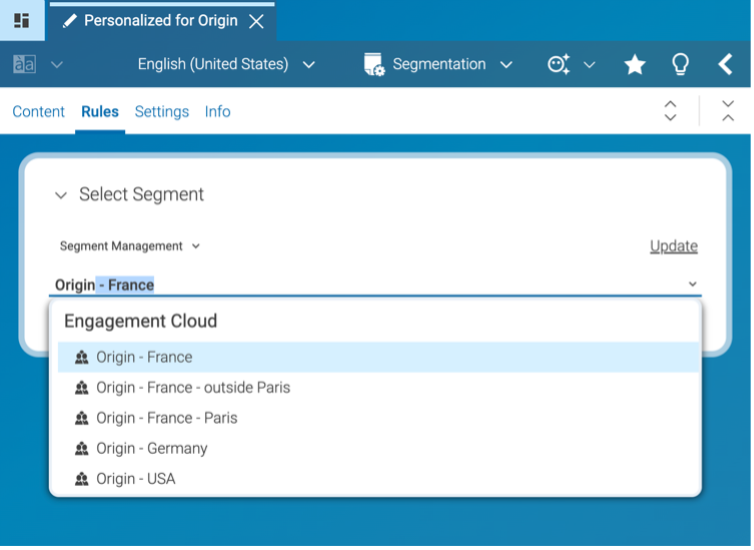
In the example below, the segmentation is configured to target visitors in Paris with a dedicated content for the “Flagship Store in Paris”, whereas all visitors outside of the Paris region will be shown the more generic story about “Trendy Accessories”.
Benefits: why relevance by location pays off
Location-based personalization pays off when location changes what customers can buy, where they can buy it or which rules apply. In those cases, relevant content raises customer engagement and conversion, and it turns online visits into foot traffic.
Deloitte Digital’s 2026 personalization research, based on surveys of 1,000 US consumers and 480 brand leaders, found three things:
- 52% of consumers are more likely to buy from brands that personalize their experiences, and they report spending 30% more with them on average.
- Consumers value personalization most when it proactively resolves an issue (67%) or saves them money (61%).
- 87% of brand leaders rate their personalization as good or excellent, while only 29% of consumers agree.
Personalization can also backfire. Gartner’s June 2025 survey of 1,464 B2B buyers and consumers found that personalized marketing created negative experiences for 53% of customers. Those customers were 3.2 times more likely to regret a purchase and 44% less likely to buy again. The same survey found that customers who experienced personalization were 1.8 times more likely to pay a premium.
Location solves a concrete problem when it shows which nearby store has the item in stock. It becomes a problem when it overwhelms the visitor or feels intrusive.
The benefits teams usually look for are:
- Higher engagement rates and conversion rates, because visitors see products, prices and stores that apply to them.
- Online-to-offline foot traffic, from store pages, local stock and in-store offers.
- Customer loyalty, built when a brand uses location to help and respects the visitor’s choice when they decline.
- Lower marketing spend per market, because one content set with location tags serves many markets instead of a separate site build for each.
- Competitive advantage in categories where rivals still show the same page to every country.
To see whether these benefits show up, track four metrics:
| Metric | What it tells you | How to track it |
|---|---|---|
| Conversion rate per location segment | Whether location-specific content outperforms the default | Compare each segment against visitors who saw the default page |
| Store locator use leading to directions, reservations or click-and-collect | Whether online visits turn into store visits | Track clicks on “get directions,” reservations and click-and-collect orders from store pages |
| Bounce rate on mismatched markets | Whether visitors land on the wrong country site | Compare bounce rates for visitors whose IP country differs from the site’s market |
| Market-switch rate | How often visitors correct the suggested market. A high rate means detection is off | Count clicks on the market or store selector after the first suggestion |
Privacy, consent and compliance for location data
Location data is personal data under GDPR when it can be linked to a person, and precise location needs explicit permission on most devices. The safe pattern is to personalize by country or by a location the visitor declares, and to ask for precise location only when the visitor sees a clear benefit, such as “show stores near me.”
The main rules to plan for:
- GDPR Article 6 requires a legal basis for processing. IP-based country detection may rely on legitimate interest, while precise location usually relies on consent.
- GDPR Article 7 sets the conditions for valid consent: specific, informed and as easy to withdraw as to give.
- ePrivacy Directive Article 5(3) covers reading information from the user’s device, including cookies and device location access.
- CCPA, as amended by the CPRA, treats precise geolocation as sensitive personal information.
Good practice goes further than the legal minimum:
- Minimize data. Store the region or chosen store rather than raw coordinates, and keep only what the use case needs.
- Use aggregated data for reporting, so you gain insight into which regions convert without tracking individuals.
- Honor privacy signals such as do-not-track preferences and Global Privacy Control.
- Be careful with VPNs and shared devices, which can attach the wrong location to a person. Avoid sensitive location-based content when the signal is weak.
Rules-based location personalization is generally outside the EU AI Act’s high-risk categories. If artificial intelligence selects the content, document how selections are made and keep people in the lead. For hosting and security questions, see our pages on a GDPR-compliant CMS hosted in Europe and trusted CMS security.
This article explains publicly available regulatory information for general awareness. It is not legal advice. Organizations should confirm their specific obligations with qualified legal counsel before making compliance decisions.
How to get started: a 5-step approach
Start with signals you already have and two or three use cases with clear value, using rules first and AI later. Most brands can launch a first location-based use case without new data collection.
- Audit your location signals. List what you already capture, such as IP country, store selections, delivery addresses and app permissions. Check which ones you may use under your consent setup.
- Pick two or three use cases. Good first choices are store proximity, regional offers and a market-switch prompt. Each has a clear benefit for the visitor and a measurable outcome.
- Tag content and define segments. Add location tags to stores, events and offers, and set up segments at country, region or radius level.
- Start with rules, then add artificial intelligence. Rules are transparent and easy to test. AI-driven selection becomes worthwhile once each segment has enough traffic and conversion data.
- Measure and expand. Compare each segment with the default experience, then roll out to the next markets.
In the CX Maturity Model, location-based personalization is often the step from segment-level relevance toward real-time, individual customer experiences. The next stage is AI-driven, agentic experiences that combine location with context and intent. Brands that want to stay ahead will need clean location tags and consent data in place first.
Ready to get started?
If you want to see location-tagged content, spatial search and location-based segments working on a live page, request a demo and we’ll walk you through a setup for your markets.
FAQ: location-based personalization
What does “location-based” mean in personalization?
In personalization, “location-based” means the content a visitor sees depends on where they are, or on the location they choose. That location can be a country, region, city or the distance to a store. Location-based personalization uses this to show the right stores, offers, products and legal information on a website or app.
Can you give an example of location-based personalization?
A common example is a retail product page that shows the nearest store, whether the item is in stock there and a local promotion. The page uses the visitor’s IP location or chosen store to pick that content. Other examples include regional tariffs for telcos and market-specific products in banking.
How do you set up location-based personalization in a DXP?
In the CoreMedia Digital Experience Platform, editors tag content with a location in CoreMedia Studio. Spatial search and query lists then show each visitor the nearest stores, events and offers. Visitor profiles with location rules let marketers show specific banners to visitors from a country, region or city. Visitors who don’t share a location see default content.
Can location-based personalization run on websites, apps and in-store screens at the same time?
Yes, if the content sits in one system. The CoreMedia DXP uses a hybrid headless CMS, so the same location-tagged content and segments can feed websites, mobile apps and in-store screens from one authoring environment. Editors manage it once, and each channel shows the version that fits the visitor’s location.
What is the difference between location-based personalization and location-based marketing?
Location-based personalization changes the content of your own website or app for each visitor. Location-based marketing, also called geolocation marketing, uses location data to serve ads, push notifications or SMS, often through a geofence. Both use the customer’s location, but marketing runs in campaigns and ad channels, while personalization runs inside the owned experience.
What is the difference between geofencing and geotargeting?
Geofencing triggers an action, such as an ad or push notification, when a device enters a virtual perimeter around a specific location. Geotargeting delivers targeted ads to people in a defined area, such as a city or postal code. Both are geolocation marketing tools, and neither changes the content on your own website.
Is location-based personalization GDPR-compliant?
Location-based personalization can be GDPR-compliant if it has a legal basis, collects only the data it needs and asks for consent before using precise location. IP-based country personalization carries less risk than GPS tracking. Always offer a default experience for visitors who decline, and confirm the details with legal counsel.
Which data sources does location-based personalization use?
Location-based personalization uses four main data sources:
- IP addresses, for country and region.
- GPS or browser geolocation, for precise position.
- Wi-Fi and beacons, inside venues.
- Declared locations, such as a chosen store, postal code or account address. These are the most accurate and the easiest to use with consent.
What is the difference between localization and location-based personalization?
Localization adapts a site to a market as a whole: its language, currency, units and legal text. Location-based personalization adapts content to the individual visitor within that market, for example by showing the nearest store or a regional offer. Most global brands need both, and they work best when built on the same content.