





















TL;DR: key takeaways
- An AI agent audit trail is a structured record of what an agent did in your CMS, on whose behalf, with which rights, and who approved the result.
- “Human in the lead” means a person stays in charge of AI work from start to finish, by briefing the agent, correcting it as it runs and owning the publishing step. The audit trail is the record that shows each of those steps happened.
- Beyond the edits themselves, log what the agent read, the attempts that were blocked, linked content that changed along with an item, and any change to a page’s path.
- Keep audit records append-only, keep sensitive data out of prompt logs, and plan retention from the six-month minimum set for high-risk AI systems.
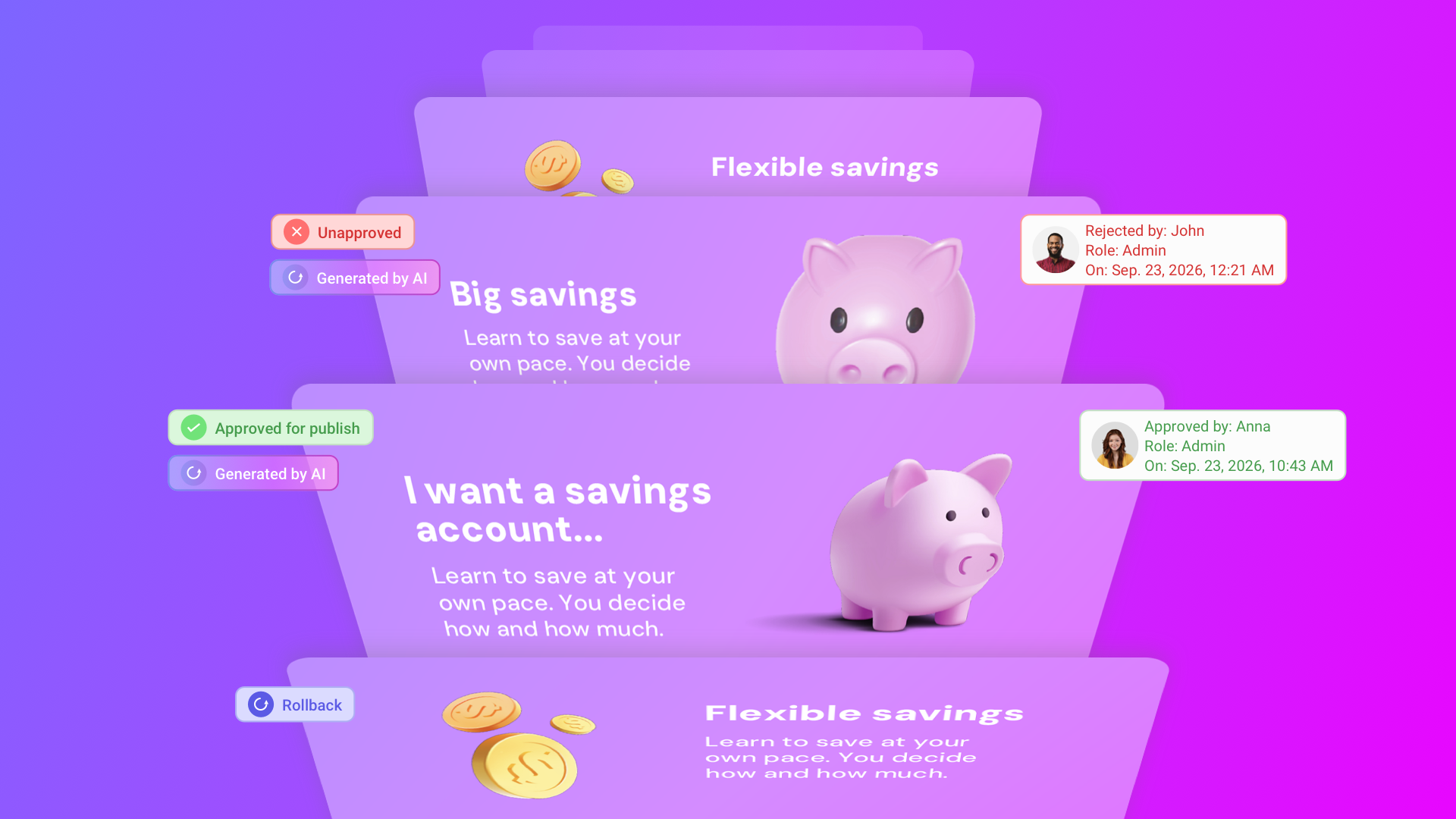
- CoreMedia KIO, the AI copilot in the CoreMedia Digital Experience Platform, works under the editor’s login, marks the content it changes as “edited by AI”, saves every version and leaves publishing to a person.
Why an AI agent audit trail is the proof behind “human in the lead”
An audit trail for AI agents turns “human in the lead” from a policy statement into evidence your AI governance can rely on. It automatically records and stores which person briefed the agent, what the agent changed and who approved the result, so every AI change has a tracked owner.
That evidence matters to CMS platform owners and compliance teams for these reasons:
- Accountability. Each change links to a personal user account, an agent and a set of permissions. A complete record that nobody can edit afterward gives you non-repudiation: no one can credibly deny an action.
- Recovery. When an AI change introduces an error, such as a wrong price on a product page, the trail shows which agent made the change, which instruction it followed and which content it used. Teams can roll the page back and fix the cause, so the same error doesn’t come back.
- Audits. Auditors can replay a workflow from preserved event records instead of interviewing editors. Without structured AI audit logging, a team can only show screenshots and chat histories, which rarely pass an audit. The same records feed security audits such as SOC 2 reports or HIPAA reviews.
Regulation points the same way:
- EU AI Act Article 12 requires high-risk AI systems to record events automatically over their lifetime. Obligations for most systems in scope apply from December 2027.
- EU AI Act Article 19 asks providers to keep those logs for at least six months.
- EU AI Act Article 14 requires high-risk AI systems to be designed so people can oversee them, including stopping or overriding the system.
- The NIST AI Risk Management Framework (AI RMF) treats traceability as part of trustworthy AI.
- ISO/IEC 42001 builds monitoring and accountability into AI management systems.
Most AI assistants in a CMS sit outside the high-risk tier, but customers in regulated industries still expect this kind of evidence. Our guide to EU AI Act compliance for enterprise content teams explains which rules apply to content today.
This article explains publicly available regulatory information for general awareness. It is not legal advice. Organizations should confirm their specific obligations with qualified legal counsel before making compliance decisions.
How AI agents connect to your CMS
AI agents connect to a CMS in one of two ways: as an embedded assistant working under an editor’s login, or as an external agent calling the CMS API with its own credentials. Each path leaves a different trail.
Embedded assistants acting as a logged-in user
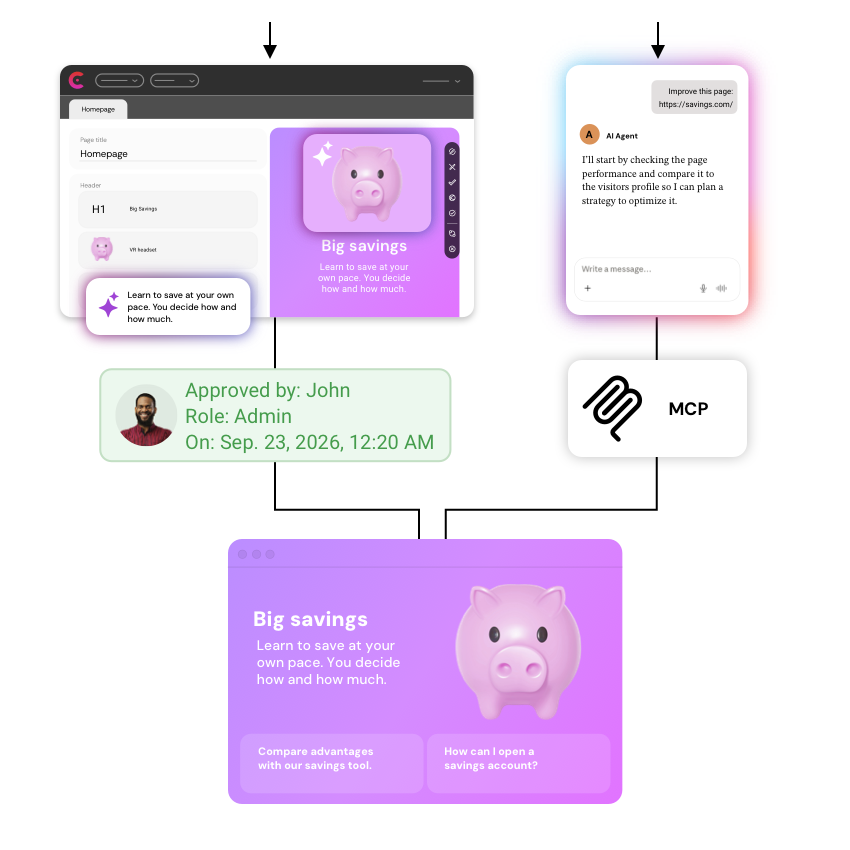
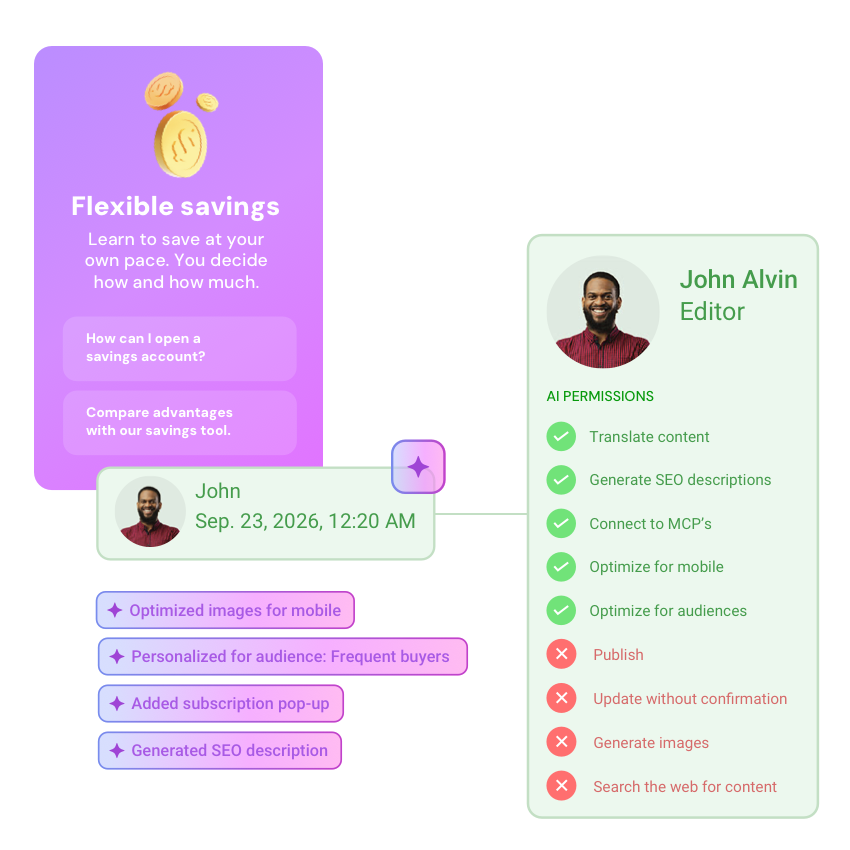
An embedded assistant works inside the editorial interface and inherits the identity and permissions of the editor who opened it, so every action belongs to a named person. The logging question is whether you can tell the AI’s part from the human’s. If the version history only says “edited by M. Weber,” you can’t prove which sentences came from the assistant, so the AI audit trail stops at the person. CoreMedia KIO works this way, acting under the logged-in editor’s identity and marking the content it touches as “edited by AI.” The CoreMedia KIO example below shows how that looks in practice.
External agents connecting through an API
External agents connect from outside the editorial interface. They include automation scripts, third-party agent frameworks, and tools built on the Model Context Protocol (MCP), an open standard that lets AI agents call tools in other systems. They usually authenticate with their own technical account, so the log has to show which account acted, which scope it held and who owns the agent behind it.
Shared credentials blur all three answers. When five automations log in with the same account, the log shows that “svc-content” changed a page without showing which agent did it or which person started the job, so the chain breaks. External agents also read content from many sources, and instructions hidden in that content can steer them through prompt injection, which only shows up if reads are logged.
What to log: the AI agent audit trail checklist
A complete audit trail should capture evidence for all agent actions: identity, the action itself, change evidence, human oversight, request context, and denied or failed attempts. Together they let you reconstruct any AI change without asking the people involved.
Identity: who acted, with which rights
Treat every agent as a non-human identity with its own ID and only the rights it needs. Each log entry should show that agent ID, the person the agent worked for, and any technical account it used to log in. Also record the permission scope at the moment of the action. Rights change, and an auditor needs to know what the agent was allowed to do on that day.
Action: what the agent read, changed or tried to do
Log what the agent opened and read, as well as what it changed. If an agent opens a confidential draft while writing a product page, details from that draft can end up in the new text, and only a record of the read shows where they came from. Log every tool call as a separate event too, such as a search, a translation service or an image tool. When an agent updates many items in one job, log the job as one event with each changed item underneath it, so you can still find what happened to a single page.
Change evidence: versions, version comparison and AI flag
Store the version before and after each change, a side-by-side comparison of the two, and a marker that AI made the change. With that comparison, a compliance officer can see that the agent rewrote an interest-rate disclaimer without opening a developer console.
Human oversight: confirmations, approvals and cancellations
Record who confirmed an AI suggestion, which human reviews took place before publishing, who approved the result, and which requests someone canceled mid-run. Human intervention is the part of the trail that proves human in the lead: a person briefs the agent, corrects it as it runs and approves what gets published, so no information goes out without someone checking it first. The log should show each of those moments.
Context: instructions, model, tokens and timing
Log the active instructions or playbook, the retrieved context, the model and version that answered, the token counts and the request duration. Also log which guardrails applied to the request, such as content rules or restricted folders, and whether any of them stopped the agent. Where your agent framework exposes it, keep a short reasoning trace that explains why the agent picked a tool.
Model and version fields matter for risk management, because model drift can lower output quality without anyone noticing. Only logged model behavior over time makes model drift visible.
Denied and failed actions
Log the attempts that failed or were blocked, together with the rule that blocked them. Some teams record only successful writes, yet a denied attempt to publish, delete or open a restricted folder is often the most telling event in the trail. A spike in denials can point to a misconfigured agent, an overreaching instruction or a prompt injection attempt, which makes denials the first signal for anomaly detection.
Minimum fields for every agent event
Every agent event should share one compact set of fields, so editors, security teams and auditors read the same audit record in the same format.
| Field | Example | Who needs it |
|---|---|---|
| Timestamp | 2026-10-12 08:41:07 UTC | Everyone |
| Actor | Human: m.weber, agent: seo-agent-02 | Security team, auditor |
| Action | Update field “teaser text” | Editor, auditor |
| Content item and version | Article 4711, version 12 to 13 | Editor, auditor |
| Outcome | Success, denied, failed or canceled | Security team |
| Approval | Approved by j.schmidt, 09:15 UTC | Auditor, compliance officer |
| AI flag | Edited by AI: yes | Editor, auditor |
| Request ID and session ID | req-8f2c, s-1931 | Security team |
The request ID ties every log entry from one agent run together, so you can replay a multi-step task in the order it happened.
Linked content and path changes
Two kinds of change are easy to miss because the agent never touched the affected content directly:
- Linked content. When an agent changes or moves an item, other items that point to it can change too, such as a homepage teaser or a related-articles list.
- Path changes. When an agent moves or renames an item, its path changes, which can break links and change the URL that visitors and AI crawlers find.
Log both alongside the minimum fields above. The CoreMedia KIO example below shows how these records look in practice.
Privacy: how much of the prompt belongs in the log
An AI audit trail should hold enough to prove what happened, and no personal or confidential data beyond what that proof needs. Prompts and outputs often contain customer names or unreleased product details, and copying them into a widely readable log creates a second exposure.
Apply data minimization, a core GDPR principle, to audit logging field by field:
- Keep the basic facts in full: who acted, what they did, which version changed and the result.
- Mask or hash prompts and outputs that can contain sensitive data, as LoginRadius’s 2026 guide to auditing AI agent activity recommends.
- Never log API keys.
- Set retention per field. A version comparison may need to live as long as the content, while a raw prompt rarely needs to outlast a short investigation.
Where agent audit logs live and who reads them
Agent audit logs usually sit in the following places:
- The agent framework. Planning steps and tool choices live in the framework that runs the agent, and they often stay on a developer’s machine unless someone forwards them.
- MCP servers. Tools connected through the Model Context Protocol log each call on the server side, with the real arguments and the identity of the caller.
- The model provider. Prompts, responses and token counts sit in the usage and request logs of the AI provider.
- The CMS content history. This holds versions, version comparisons, AI flags, approvals, linked items and path changes, and it is the layer editors and auditors read.
- Central storage or a compliance portal. Production audit logs are exported to append-only storage such as AWS S3, Azure Blob Storage or Google Cloud Storage, where they survive crashes and later edits. This is where the records that matter from the other four places should end up. For Microsoft 365 agents, audit records live in Microsoft Purview.
Security teams use the central layer for real-time monitoring, and rules there can trigger alerts on unusual agent activity. Retention starts at six months for logs of high-risk AI systems, and sector rules often go far beyond that. The same LoginRadius guide puts AI audit logging retention at one to seven years under financial and healthcare standards.
Access needs its own rules. Name an owner for each layer, give compliance teams read-only access through role-based access control, and log every access to the audit log itself. Agent audit trails without a named owner turn into a pile of files nobody can vouch for.
How CoreMedia KIO creates an audit trail for AI changes
CoreMedia KIO, the AI copilot embedded in the CoreMedia Digital Experience Platform, builds its AI audit trail into the content history editors already use. Every action carries the editor’s identity, every change is versioned, AI-touched content is flagged, and publishing stays with a person.
Here is how that maps to the checklist:
- Identity. All CoreMedia KIO agent actions, every read and every write, run under the logged-in user’s identity and within that user’s CMS permissions. CoreMedia KIO can’t act outside the rights of the editor who started it. API calls to the CMS run as an authenticated user or service account, subject to that account’s access rights.
- Change evidence. Content that CoreMedia KIO creates or changes is marked “edited by AI,” which separates AI changes from human edits. Every change is versioned, can be compared with the previous version, and can be reverted.
- Linked content and path. CoreMedia Studio shows which content links to an item and whether its path was altered, so changes outside the edited item stay visible.
- Human oversight. CoreMedia KIO cannot publish or delete content, so a human takes every critical step. Teams can require a confirmation before changes apply, and editors can cancel requests that are still running. Inside the chat, a per-conversation overview lists every content item CoreMedia KIO touched in that session.
- Context. Per-request insights show the playbooks, tools, tokens and timing behind each request. With debug output switched on, CoreMedia Studio shows which playbooks a request used. Metrics for token usage, request duration and tool calls, including playbook calls, are exposed through Prometheus and can be viewed in Grafana or similar tools.
- Guardrails. Administrators can limit CoreMedia KIO to specific user groups, switch individual functions off with feature flags, and set organization-wide rules through playbooks.
In security reviews and RFPs, enterprise buyers regularly ask whether AI-initiated actions can be told apart from human edits. With CoreMedia KIO, the answer sits in the content module itself: the AI flag, the editor’s identity, and a version comparison a reviewer can check or roll back. See how CoreMedia KIO supports AI-assisted content operations.
How CoreMedia KIO creates an audit trail
Questions to ask your CMS vendor about AI agent logging
Ask these questions about audit logging before any AI agent gets write access to your content:
- Does every agent action run under a named user or a unique agent ID, instead of a shared account?
- Can editors tell AI changes apart from human edits?
- Does the agent stay within the permissions of the user who started it?
- Can the agent publish or delete content without a person?
- Can you see which playbooks and tools an AI request used?
- Can editors compare each AI change with the previous version and roll it back?
- Does the CMS show linked content that changed along with an item, and any change to its path?
- Where are audit records stored, who can access them, and how long are they kept?
AI visibility: tracking how AI systems use your content
So far, this article has covered AI agents working inside your CMS. AI visibility tracking looks at the opposite case: AI systems outside your company that read your published pages and cite them in their answers. The audit trail records what changed inside the CMS, and visibility tracking shows if and with what context AI answers mention your brand.
What an AI visibility tool tracks
An AI visibility tool measures how often AI assistants such as ChatGPT, Perplexity or Google AI Overviews mention your brand and which of your pages they cite. Typical reports cover:
- Brand mentions and citations in AI answers, based on tracked prompts
- The specific URLs that get cited
- AI crawler requests per page from your server logs, for example from GPTBot, ClaudeBot or PerplexityBot. This is the outside counterpart to the data access records you keep for agents inside the CMS.
Connect governed content to what AI answers say
Your version history shows the live content of each page on any given date. If an AI answer repeats an outdated product claim, check your server logs for the last time an AI crawler visited that page, then check which version was live that day. If the old claim was still on the page, the AI system probably hasn’t picked up your correction yet. If it was already gone, the answer likely comes from another source, such as a third-party site of the model’s training data. Moved pages need the same check, because AI answers may still cite the old URL.
AI systems choose their own sources, so the lever a team holds is the structure, accuracy and freshness of its own content. That is what a GEO-ready CMS is designed for. Managing every page from one governed single source of truth for enterprise AI means AI crawlers find the approved version, instead of an old copy on a forgotten microsite.
Control inside the CMS, visibility outside it
An AI agent with write access to your CMS will eventually make a change someone questions. Teams that log who acted with which rights, what changed (including linked content and paths) and who approved the result can answer from records instead of memory. Those same records show which version of a page AI systems could have read. If you’re comparing how CMS vendors handle AI agent logging, book a CoreMedia demo and see how CoreMedia KIO flags AI edits, keeps every version and leaves publishing to a person.
Frequently Asked Questions
What is an AI agent audit trail?
An AI agent audit trail is a chronological record of every consequential action an AI agent takes, stored so that nobody can change it later. It covers what the agent read, what it changed, on whose behalf, with which permissions, and who approved the result. In a CMS, an AI agent audit trail combines version history, AI flags, approval records and agent event logs.
What is the difference between agent logging and an audit trail?
Agent logging is the raw stream of events an AI agent produces, such as tool calls, errors and token counts. An audit trail is the structured, owned and protected record built from those logs to prove accountability. It links each event to a person, a policy and a content version, which is the evidence compliance officers ask for.
How can you tell AI edits from human edits in a CMS?
You can tell AI edits from human edits in a CMS when the platform marks AI changes on the content itself and keeps every version. In CoreMedia, content that CoreMedia KIO creates or changes is marked “edited by AI,” and every change is versioned and can be compared with the previous version. The edit also runs under the logged-in editor’s identity, so each AI change shows both the AI’s part and the person who started it.
Should AI agents be allowed to publish content?
AI agents should not publish content on their own in most enterprises, because publishing is the step where legal, brand and regulatory accountability lands. AI agents can draft, translate, tag and optimize content, while a named person reviews each change and owns the publishing step. CoreMedia KIO is built this way: it cannot publish or delete content, so a human takes every critical step.
How long should AI agent audit logs be kept?
AI agent audit logs should be kept for at least six months, the minimum the EU AI Act sets for automatically generated logs of high-risk AI systems, and often for years. Audit logs tied to automated decision-making in financial services and healthcare are commonly kept for one to seven years, so check the rules for your sector.
Do AI agent audit trails expose personal or sensitive data?
An AI agent audit trail can expose personal or sensitive data if it stores full prompts and outputs, because those often contain customer names or unreleased product details. A well-designed AI agent audit trail keeps identity, action, version and outcome in full, masks or hashes prompt content, never stores API keys, and limits read access to the people who need it. That follows the data minimization principle of the GDPR.